

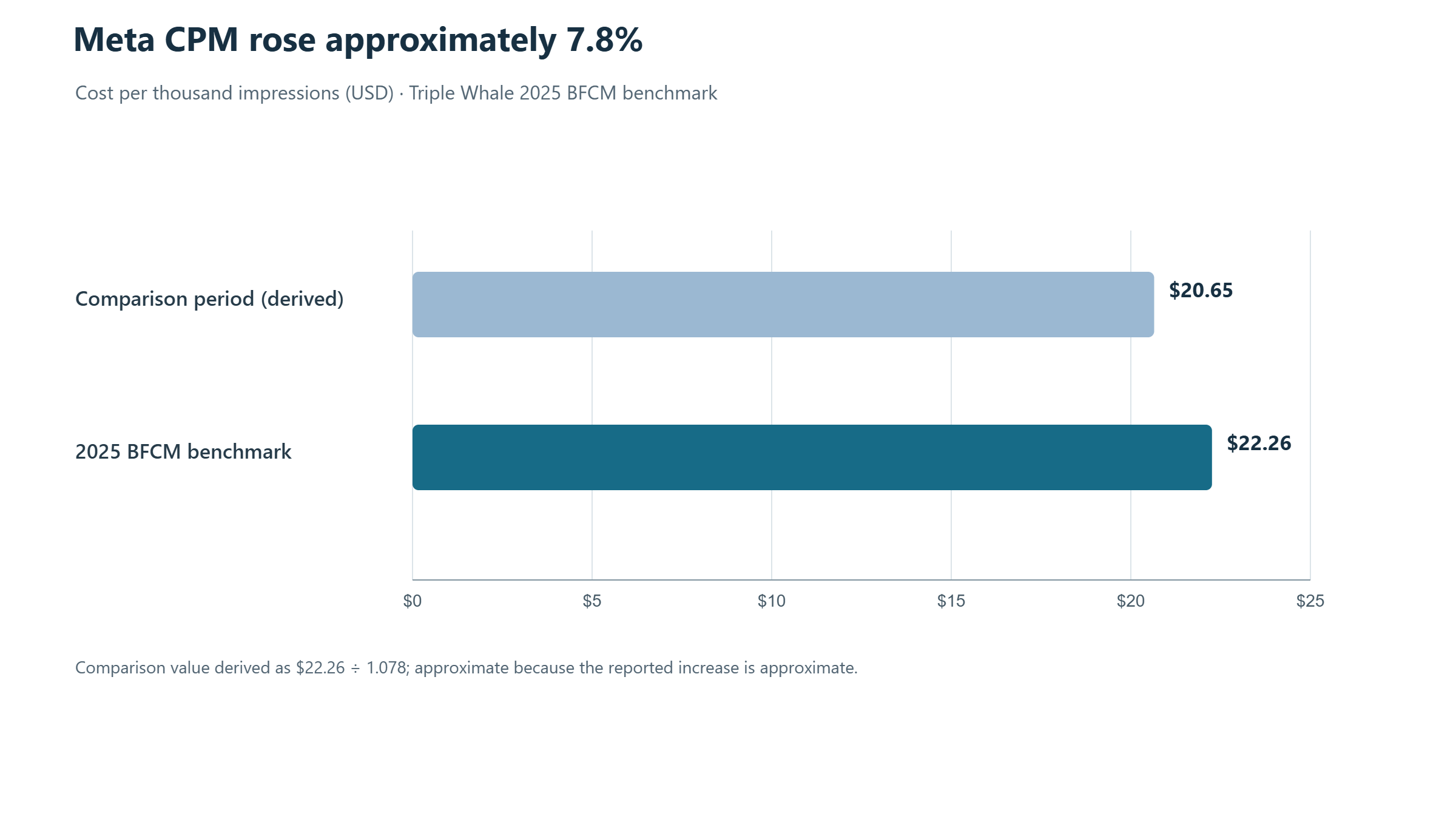
Facebook retargeting uses ads to reconnect with people who previously interacted with a business but did not complete a desired action, such as buying a product or signing up for a newsletter. Advertisers build audiences from eligible website, app, customer-list, and Meta-platform activity, then tailor ads to those people’s earlier interests. Triple Whale’s 2025 BFCM benchmark lists Meta’s cost per acquisition at $34.06 and cost per thousand impressions at $22.26, with CPM up approximately 7.8% against its comparison period; those benchmarks describe a specific retail window, not a forecast for every campaign.
This guide explains how retargeting works, where its audience data comes from, how to build and launch a campaign in Meta Ads Manager, and how to measure performance. It also covers segmentation, dynamic product ads, exclusions, privacy considerations, common mistakes, and how retargeting compares with prospecting.
What Is Facebook Retargeting?
Facebook retargeting is paid advertising aimed at people who have already shown interest in a business and have not yet taken the action the advertiser wants. A person might have viewed a product, visited a pricing page, engaged with a Facebook post, or started checkout; an advertiser can use eligible signals from those interactions to create an audience and deliver relevant ads.
The name can be a little confusing: Meta operates Facebook, Instagram, Messenger, and the Audience Network, and eligible ad placements depend on campaign settings and availability. A Facebook retargeting campaign can therefore reach people across more than the Facebook feed. Marketers also use Facebook remarketing to describe the same general practice, although some teams reserve “remarketing” for email follow-ups and “retargeting” for paid ads.
Who Is Eligible to See a Retargeting Ad?
A person qualifies for a retargeting audience when they have a usable, eligible interaction with the business or its content and have not been excluded by the campaign’s audience rules. Eligibility does not mean every site visitor will be matched or receive an impression: data permissions, available signals, audience size, platform policies, auction competition, and delivery settings all affect reach.
For instance, a store could create separate audiences for product viewers, cart abandoners, past buyers, or people who watched a video. The audience definition determines who may see the ad; the campaign’s delivery system determines whether and when an eligible person actually sees it.
How Does Facebook Retargeting Work?
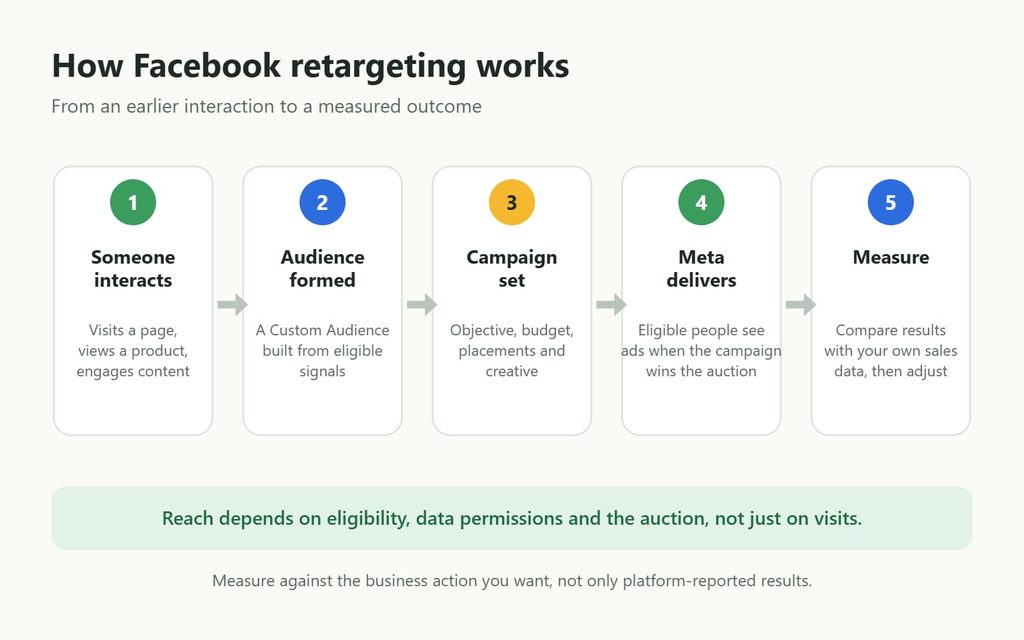
Facebook retargeting connects an earlier interaction to an audience in Meta Ads Manager, then delivers an ad to eligible members of that audience. The interaction may come from a website, app, customer list, Facebook Page, Instagram account, or another supported Meta engagement source.
Tracking and Data Collection Methods
For website activity, businesses commonly use the Meta Pixel, a browser-based data connection installed on a site. It can record configured events, such as viewing a page, adding an item to a cart, or completing a purchase, subject to the site’s setup and applicable permissions. The Pixel does not guarantee that Meta can identify or match every visitor to an account.
The Conversions API provides a server-to-server route for sharing selected events with Meta. Some advertisers use it alongside the Pixel to support measurement when browser signals are limited. If both systems send the same event, configure event matching and deduplication appropriately so reporting does not count the event twice. Review your implementation and consent controls with the people responsible for your analytics and privacy requirements.
Website tracking is only one route. Custom Audiences can also use eligible customer information, app activity, and engagement with Facebook or Instagram content. Each data source has its own setup and eligibility requirements; a customer list, for example, should contain information the business has permission to use for advertising.
From Interaction to Ad Impression
- Someone interacts. They visit a page, view a product, engage with content, use an app, or appear in a permitted customer-data source.
- An audience is formed. A business creates a Custom Audience and defines the qualifying behavior, source, and membership window available in Ads Manager.
- The advertiser sets the campaign. The campaign specifies an objective, audience, budget, placements, schedule, and creative.
- Meta delivers eligible ads. The system can show ads to audience members when the campaign is eligible to serve and wins an opportunity in the ad auction.
- The business measures outcomes. Advertisers compare reported results with their own sales, leads, or analytics data and adjust the campaign.
Where Can Retargeting Ads Appear?
Depending on campaign configuration and placement eligibility, ads may appear on Facebook, Instagram, Messenger, and partner placements such as the Audience Network. Choose placements based on the creative and destination experience rather than assuming every format will work everywhere. Check current specifications in Facebook Ads Sizes before preparing image, video, carousel, or Stories assets.
Which Audiences Can You Retarget?
Meta Custom Audiences let advertisers group people according to supported interactions or customer information. The useful question is not simply “Who visited?” but “What did they do, and what should they see next?”
| Audience source | Example segment | Possible follow-up message |
|---|---|---|
| Website activity | Viewed a product page but did not purchase | Show the product again, answer a common question, or highlight a related benefit |
| Website activity | Added an item to the cart but did not complete checkout | Remind them about the item and link directly to the cart |
| Website activity | Visited a service or pricing page | Offer a consultation, explain the service, or address an objection |
| Facebook or Instagram engagement | Watched a video or interacted with a post | Continue the story with a useful next step |
| Customer list or app activity | Existing customer or app user | Promote a relevant upgrade, renewal, or complementary product |
Segment by Behavior and Intent
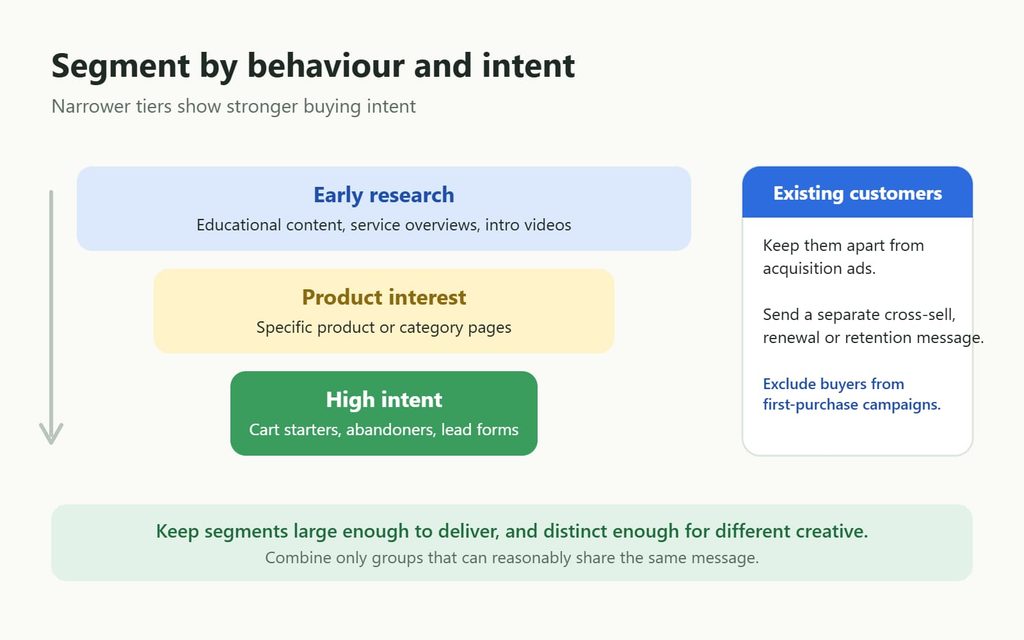
Segment your audience by meaningful actions rather than treating all visitors alike. A person who spent time on a product page has shown a different kind of interest from someone who opened a social post. Pages visited, time spent on a page, cart activity, content engagement, and recency can all help shape the audience where the selected source and Ads Manager options allow them.
- High intent: checkout starters, cart abandoners, or visitors to a lead form.
- Product interest: visitors to specific product or category pages.
- Early research: visitors to educational content, service overviews, or introductory videos.
- Existing customers: people who have already purchased and may respond to a separate cross-sell or retention message.
Keep segments large enough for delivery and distinct enough to support different creative. A tiny audience split into many ad sets can fragment budget and slow learning; a single audience containing every interaction can make the message feel generic.
Custom Audiences, Dynamic Ads, and Lookalike Audiences
A Custom Audience is the named Meta audience feature advertisers use to group people from supported sources, such as website activity, customer lists, apps, or social engagement. Treat that audience as the core retargeting pool, then use exclusions and creative to make the campaign specific.
Dynamic product ads can automatically select items from a product catalog based on a person’s activity, such as products they viewed or added to a cart. They work best when the catalog is accurate, product links resolve correctly, and event data maps to the right catalog items. Without those connections, automation can display the wrong product or fail to show a useful reminder.
A Lookalike Audience is different: it helps find new people who resemble a chosen source audience. Lookalikes expand prospecting beyond the people who already interacted with the business; they are not themselves a retargeting audience. Test them as a separate acquisition strategy, and compare their cost and downstream quality with campaigns aimed at known engagers.
How to Set Up a Facebook Retargeting Campaign
You can set up a Facebook retargeting campaign in Meta Ads Manager by preparing the data source, creating the audience, choosing a goal, and matching the ad to the audience’s previous action.
Step 1: Check Your Tracking and Destination
Confirm that the Meta Pixel is installed if you plan to use website activity. Test the events you intend to use, check that the intended pages and conversions register, and verify your customer-data permissions. If your business uses the Conversions API, confirm that server events match the right actions and that duplicate events are handled correctly.
Then test the landing page on a phone and a desktop. Does the page load, show the product or offer promised in the ad, and make the next action obvious? A beautifully targeted ad cannot fix a confusing checkout or a broken form.
Step 2: Build the Custom Audience
- Open the audience tools in Meta Ads Manager and choose to create a Custom Audience.
- Select a supported source, such as website activity, a customer list, app activity, or Facebook or Instagram engagement.
- Choose the qualifying event or interaction, such as visitors to a specific page or people who engaged with content.
- Set the membership period and any inclusion or exclusion rules available for that source.
- Name the audience clearly, including the source and behavior. For example, “Product viewers- no purchase” and then save it.
Build a separate audience for purchasers when you need to exclude buyers from an acquisition or abandoned-cart campaign. For repeat purchases, create a distinct customer campaign with a reason to return rather than showing the same pre-purchase message.
Step 3: Create the Campaign and Ad Set
In Ads Manager, select the objective that best matches the business result (such as sales or leads) then choose the relevant conversion location and performance goal offered for your account. At the ad-set level, select the Custom Audience, add appropriate exclusions, set a budget and schedule, and review placements. Interface labels and available options can change, so use the current Ads Manager flow as your source of truth.
Keep prospecting and retargeting reporting distinct. If you combine people who already know your brand with cold audiences in one ad set, the resulting averages can hide which group produced the result.
Step 4: Match the Creative to the Interaction
Make the ad feel like the next helpful step, not a mysterious reminder that the business has been watching. Someone who viewed a product may need a clear benefit, comparison, or review; a cart abandoner may need a direct route back to checkout; a video viewer may need a deeper explanation.
- Use a direct, specific headline instead of a generic “Come back” message.
- Link to the product, service, or form connected to the audience’s activity.
- Use a discount only when the margin and offer economics support it.
- Check that the ad, image, and landing page tell the same story.
Step 5: Publish, Check Delivery, and Improve
After launch, confirm that the campaign is approved, spending as intended, and recording the events that matter. Give changes enough time and data to be useful; frequent edits to a small audience can make results difficult to interpret. For broader help with campaign planning and account execution, explore Facebook Marketing services.
What Makes Retargeting Valuable and Where It Can Fall Short
Retargeting gives a business another chance to reach people who already showed interest, but a warm audience does not guarantee a sale or a profitable return. Results depend on the offer, audience quality, creative, timing, landing page, competition, measurement, and costs.
Potential Benefits
- A more relevant message: Ads can reflect a person’s prior interest, such as a viewed product or service page.
- A clearer path back: A direct link can return someone to the product, cart, or sign-up flow they left.
- More useful audience distinctions: Separate segments let a business address different questions at different stages of the path to purchase.
- Support for longer decisions: Retargeting can bring an interested visitor back while they compare options or seek more information.
Limits and Trade-Offs
Audience size can be small, tracking may miss eligible activity, and repeated exposure can create ad fatigue. Attributing a sale to an ad also does not prove the ad caused the sale: a person may have purchased anyway or encountered other marketing in the meantime. Compare platform reporting with business outcomes and use consistent attribution settings when judging performance.
Retargeting can also become wasteful when a campaign spends heavily on a tiny pool, repeatedly targets recent buyers, or offers a discount to people who were already close to purchasing. The right comparison is not simply warm versus cold audience; compare incremental value, cost, and customer quality against the alternatives.
Benchmarks Need Context
Triple Whale’s 2025 BFCM benchmark, lists a Meta CPA of $34.06 and CPM of $22.26, with CPM approximately 7.8% higher against the stated comparison period. Seasonal retail auction costs do not predict a specific advertiser’s retargeting result. Check your own margin, baseline conversion rate, average order value, and campaign attribution before deciding whether a CPA is acceptable.
For another point of context, Shopify’s article on Facebook retargeting cited an August 2022 ecommerce-store average conversion rate of 1.62%; that figure is time-bound and broad, not a target for every store or a retargeting-specific benchmark. See Shopify’s Facebook retargeting guide for its explanation of the benchmark and campaign basics.
How to Measure and Optimize Campaign Performance
Measure Facebook retargeting against the business action you want, then diagnose the stages between ad exposure and that action. Ads Manager can report delivery and attributed results, while web analytics, ecommerce records, or a CRM can help validate what happened after the click.
| Metric | What it helps diagnose | Possible next step |
|---|---|---|
| Reach and frequency | How many people saw ads and how often | Refresh creative or review audience size if exposure becomes repetitive |
| CTR and landing-page views | Whether the creative earns clicks and the destination loads | Check the message match, link, page speed, and mobile experience |
| Conversion rate | Whether visitors complete the desired action | Review the offer, form, checkout, and page clarity |
| CPA or cost per lead | How much the campaign spends per reported outcome | Compare with allowable acquisition cost and verified business results |
| ROAS and revenue | Reported return relative to ad spend | Validate attribution, refunds, margins, and revenue outside the platform |
Practical Optimization Tests
- Test audience intent: compare product viewers with cart abandoners instead of merging them immediately.
- Test the message: contrast a product-benefit ad with a testimonial, explainer, or direct offer.
- Review exclusions: exclude completed buyers when the campaign promotes a first purchase, then create a separate repeat-purchase message if appropriate.
- Watch frequency: look for rising exposure paired with declining engagement or conversions. Frequency controls vary by campaign type, so monitor delivery and use the controls Ads Manager makes available.
- Improve the destination: remove unnecessary steps, clarify the action, and ensure the landing page matches the ad.
Common Facebook Retargeting Mistakes
Most retargeting problems come from a mismatch: the wrong audience sees the message, the ad promises something the landing page does not deliver, or measurement gives the team a false sense of performance.
Retargeting Everyone with One Ad
A homepage visitor, a product viewer, and a checkout starter have different levels of intent. Segment by action and tailor the next message. If the segments become too small to deliver, combine only groups that can reasonably share the same creative.
Forgetting Purchase-Based Exclusions
Exclude past purchases from a campaign designed to win a first purchase, where the data source and campaign setup allow it. Otherwise, customers may keep seeing acquisition ads after they have converted. For repeat buyers, build a separate message around replenishment, complementary products, or customer support.
Showing the Same Ad Too Often
Repeated impressions can irritate people and weaken performance. Rotate creative, reassess audience duration, and monitor frequency alongside engagement and conversion results. A frequency cap is not universally available across every campaign setup, so do not rely on a single control to prevent fatigue.
Using Discounts as the Default Fix
A discount can help resolve price hesitation, but it can also cut margin or train customers to wait for a deal. Test non-discount messages—such as product details, shipping information, or a clearer explanation of value—before making incentives permanent.
Ignoring Measurement and Privacy
Check whether events fire accurately, whether the landing page records conversions, and whether platform reports align with your store or CRM. Collect and share data only through a setup that fits your business’s permissions and privacy obligations. A pixel or server connection does not remove those responsibilities.
From Retargeting to the Wider Advertising Mix
Retargeting supports the middle and later stages of a customer journey; it cannot replace discovery campaigns that introduce a business to new people. Combine the two deliberately: use prospecting to reach potential customers, then retarget eligible engagers with a message that advances their decision.
Retargeting vs. Prospecting
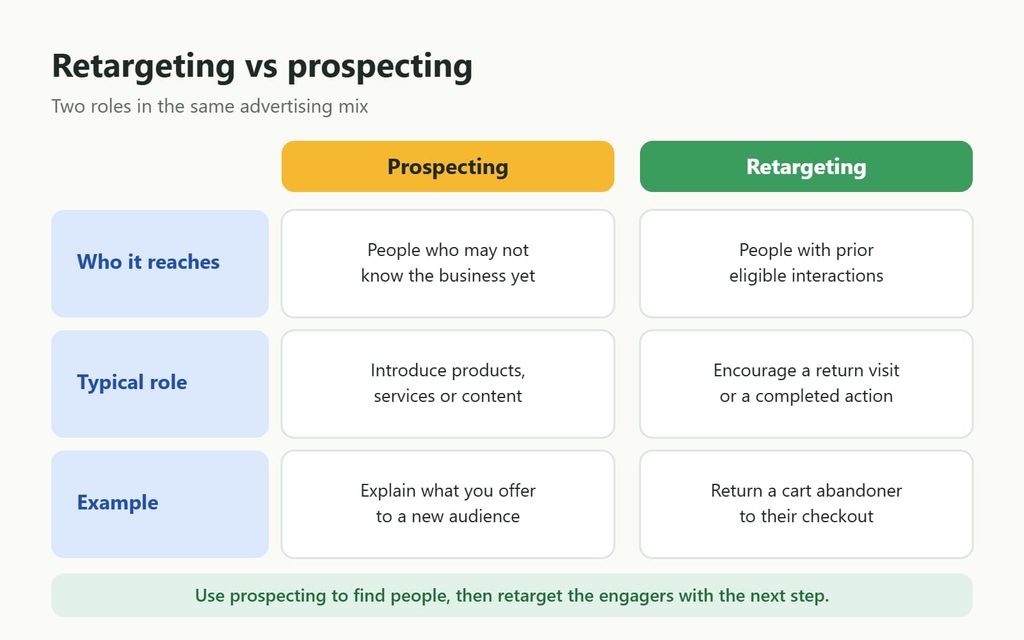
Some businesses also use Google Ads to reach people through search and other Google inventory; that channel can complement Meta campaigns, but its audience signals and placement context differ. For planning social content alongside paid activity, creators can also consult the Guide for Digital Creators on Facebook.
Facebook Retargeting FAQs
Is Facebook retargeting the same as Facebook remarketing?
In paid social, the terms usually describe the same practice: advertising to people who previously interacted with a business. Some marketers use “remarketing” more broadly for email or customer follow-up, so check how a particular team defines it.
Can I retarget people who engaged with my Facebook Page?
Yes, Meta Ads Manager supports engagement-based Custom Audiences for eligible Facebook and Instagram interactions. The exact engagement types and audience options depend on the source and current platform settings.
Do I need the Meta Pixel to retarget people?
No. The Pixel is a common route for website-based audiences, but supported customer lists, app activity, and Facebook or Instagram engagement can provide other audience sources. Choose the method that fits the interaction you want to use and your data permissions.
Can I retarget visitors who did not buy and exclude those who did?
Yes. Where your event tracking supports it, create an audience of relevant visitors or cart abandoners and exclude purchasers from that campaign. Verify that purchase events are recorded reliably so completed buyers do not remain in the acquisition audience unnecessarily.
Are dynamic ads only for ecommerce?
Dynamic product ads are especially useful when a business has a product catalog and behavior data that can match people to specific items. Other advertisers can still personalize creative by audience segment without using a product catalog.
What should I check if a Custom Audience is not delivering?
Review the selected source, event setup, audience rules, exclusions, campaign status, placements, budget, and ad approval. Also check whether the audience has enough eligible members to deliver; a saved audience does not guarantee broad reach.
How should I choose between Facebook retargeting and Google Ads?
Choose based on where your audience shows intent and which placements suit your offer. Meta retargeting can reconnect with people based on eligible prior interactions across Meta sources; Google Ads can reach users in Google’s advertising ecosystem. Compare each channel using the same business outcome, attribution window, and cost definition through your Google Ads planning process.

